E-commerce · Tech retail
CompumilleniumTech store with a synced catalogue, PayPhone payments and its own admin panel
E-commerce for laptops and tech in Guayaquil: a catalogue synced with the supplier, PayPhone payments and a custom-built admin panel.
Technologies
- Next.js 16
- React 19
- TypeScript
- NestJS 11
- PostgreSQL (pg)
- Cloudflare R2
- Tailwind CSS v4
- shadcn/ui
- next-intl
- Recharts
- TipTap
- React Email + Resend
- ExcelJS
- sharp
- PayPhone
- Turborepo + Bun
- Docker + Railway
- Playwright
- Google Analytics 4

1,000+
product pages in the sitemap
22
admin panel sections
9
transactional emails
24
provinces for shipping rates
My role
Full stack development of the store, the admin panel and the API for authentication, sync and backups. Delivered through NM Tech Studio.
The problem
The store came from an earlier system (Stock Manager Advance) and then lived inside the repair shop's ERP. On top of that, a large part of the catalogue is not written by hand: the supplier Siglo 21 publishes it through its API, with cost prices, HTML spec sheets and images. The business needed a store of its own that feeds itself from that catalogue, takes card payments in Ecuador while still accepting bank transfers and cash, and that the team can run - orders, shipping, content, prices - without asking for a deploy.
What I built
- A store with a catalogue filterable by category, brand and price range, product pages with a gallery, a cart and checkout for guests or registered users.
- Automatic sync with the Siglo 21 supplier catalogue: it creates and updates products, brands and categories, derives the sale price from cost with a configurable margin and keeps up to three images per product, converted to WebP.
- Three payment methods: PayPhone (Cajita de Pagos), bank transfer and cash, with receipts attached to the order for the payments a person has to confirm.
- A checkout that autofills the buyer's details from their national ID number and records unfinished checkouts, so the team can contact whoever filled in their details and did not pay.
- An admin panel with 22 sections in five groups - general, catalogue, sales, marketing and system - and custom roles with per-resource permissions.
- Nine transactional emails built with React Email and Resend - confirmation, update, shipped, ready for pickup, delivered, cancelled, payment received, payment reminder and an internal new-order alert -, with editable copy and previews from the panel.
- A 16-section home page whose sections can be reordered and switched off, contact and repair-service pages, downloadable PDF catalogues and legal pages, all editable from the CMS.
- Shipping with rates per province or city across Ecuador's 24 provinces, per-product shipping costs and in-store pickup.
How it's structured
A Turborepo and Bun monorepo: the store and the panel in Next.js, a NestJS API for authentication and scheduled jobs, and two shared packages. Both apps point at the same PostgreSQL database and store files in Cloudflare R2.
- apps/web: the public store with Spanish routes (/productos, /producto/[slug], /carrito, /finalizar-compra, /cuenta, /catalogos, /servicio-tecnico, /contacto), the sign-in pages and the panel under /admin.
- apps/api (NestJS): sign-in, registration, session refresh and password change, admin user management, the supplier sync, product purging and backups.
- packages/db: 71 idempotent SQL migrations that define the schema. packages/auth-contract: the JWT shape shared by the web app and the API.
- Data: everything goes through four client factories over pg. Mutations are server actions, and API routes are kept for exports, search, coupons and payments.
- Payments: /api/payments/payphone/prepare records the pending transaction and /api/payments/payphone/confirm closes it when PayPhone sends the customer back.
- Scheduled jobs in the API: the supplier sync every five minutes, an hourly backup check and a daily purge at 03:00 of products deleted more than 14 days earlier (configurable).
- SEO: a sitemap with the product pages and the CMS pages, a robots file that excludes account, checkout, API and filtered URLs, and ComputerStore and FAQPage JSON-LD built from the business details edited in the panel.
- Deployment: the web app and the API as Docker containers on Railway, with migrations applied before the API starts.
A catalogue that maintains itself
A large part of the catalogue comes from the Siglo 21 supplier API. The store does not import it once: it keeps following it, and it respects whatever the team changed by hand.
- It requests 50-product pages - the API's cap - and accumulates up to the configured batch size, 200 by default, moving forward with a cursor.
- Sale price = cost / (1 - margin), with a 12% default margin and a 95% ceiling so the price can never reach zero or go negative.
- Up to three images per product, converted to WebP with sharp and uploaded to R2.
- Per-field locks: if someone set the name, price or description by hand, the sync leaves them as they are and keeps updating everything else. A product can also be excluded entirely.
- At the end of a pass it retires whatever the supplier no longer lists, unless the store holds its own stock of that product.
- It runs on its own inside the configured window - by default Monday to Friday, 08:00 to 18:00 Guayaquil time - and the next cycle can be triggered by hand from the panel.
Inside the site
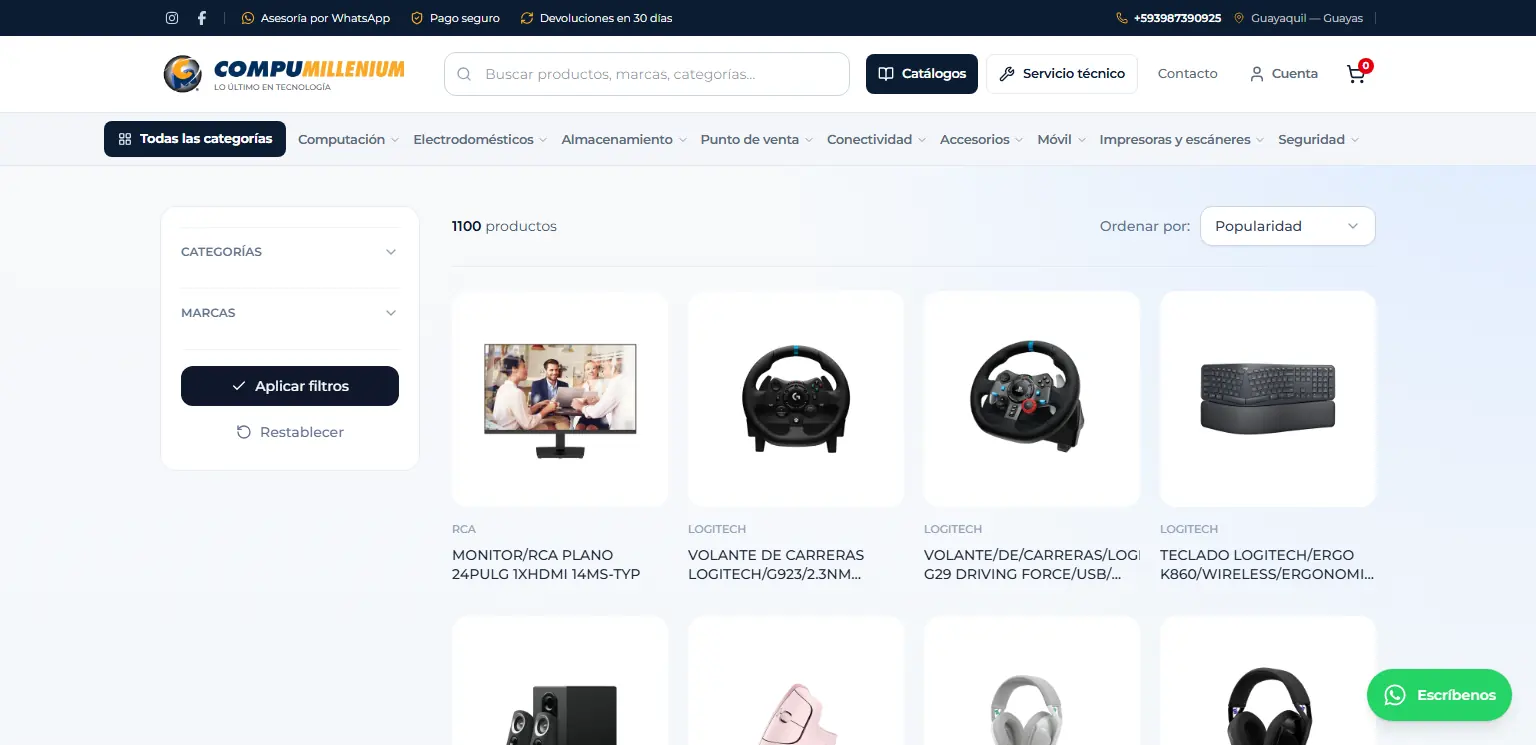
Catalogue with category and brand filters. 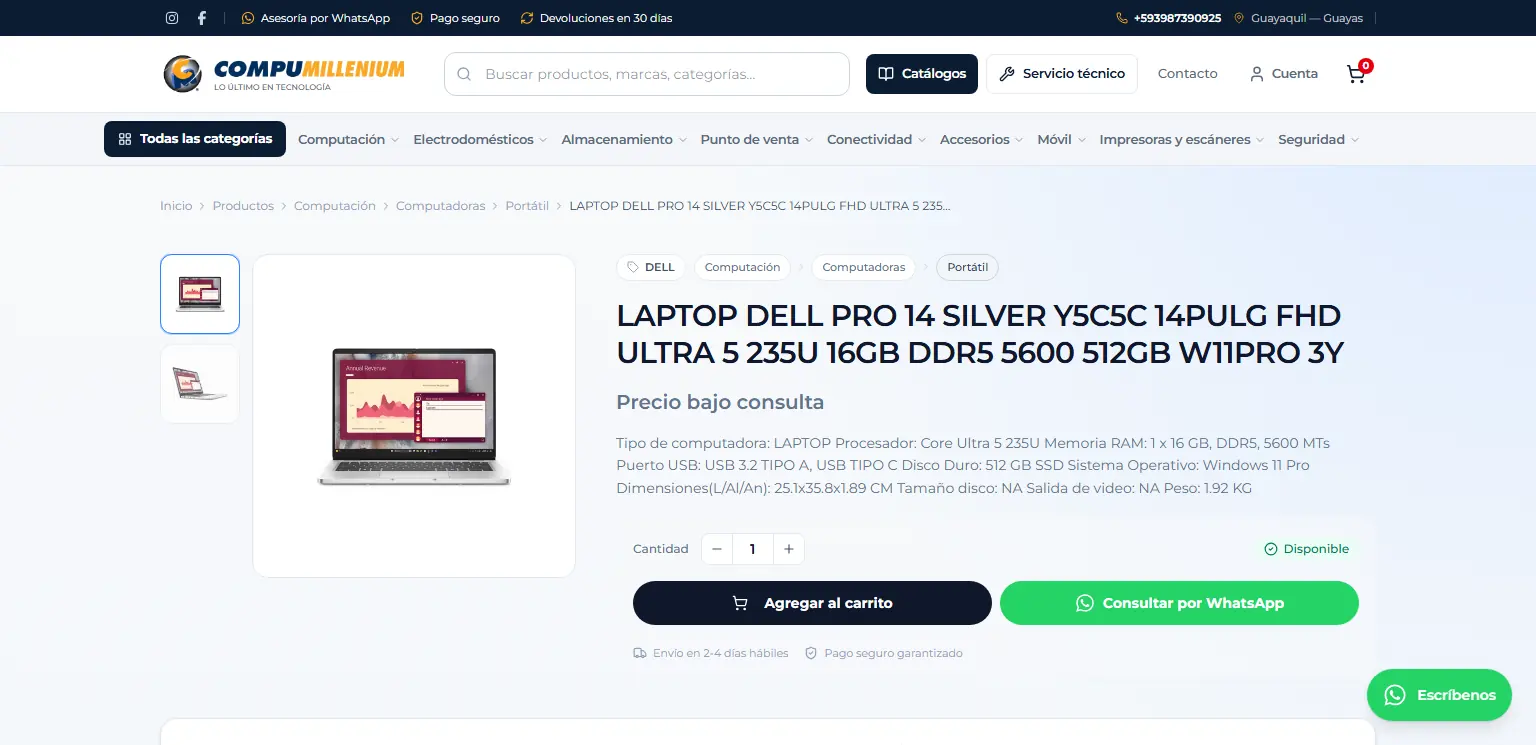
Product page with gallery, specs, cart and WhatsApp enquiry.
The admin panel
Each module covers one part of the day-to-day operation, without leaving the panel.
Dashboard
Sales trend, order status, best-selling products and quick links on the landing screen.
Inventory
Create and edit products, Excel import and export, bulk actions, duplicate detection and a trash with restore.
Categories and brands
The catalogue taxonomy, with an image and focal point per category, feeding the store's filters and menu.
Reviews
Moderation of product reviews.
Orders
Status, items and shipping for each order, payment receipts, reminders, printing and a pending counter in the sidebar.
Checkouts
Who filled in their details at checkout and did not finish paying, with their cart exactly as they left it, so they can be contacted.
Customers
Customer list with an individual profile page.
Coupons
Discount codes validated at checkout.
Shipping
Rates per province or city across Ecuador's 24 provinces.
Payments
PayPhone, bank transfer to several bank accounts and cash, with a configurable PayPhone fee and a test mode.
Subscribers and emails
Newsletter subscribers and the nine transactional templates, editable and with previews.
Content and catalogues
Editable home, contact, repair-service and legal pages, plus the downloadable PDF catalogues.
Appearance and settings
Header, footer and theme; identity, taxes, languages, currency and the switch that opens or closes the store.
S21 integration
Credentials, margin, batch size and time window for the supplier sync, plus a manual run.
Backups
Scheduled and on-demand database backups stored in R2 with 30-day retention and download through a temporary link.
Users and roles
Team accounts and custom roles with a per-resource permission matrix, which the server re-checks on every action.
Technical decisions
- A custom query builder with the same chainable shape the whole codebase uses (.from().select().eq()…), compiled to parameterised SQL over pg. That moved the platform onto its own PostgreSQL database without touching the business logic, and parity tests guard that surface against drift.
- Authentication lives in a NestJS API that signs the JWTs; the web app verifies them locally with the shared secret, so the Next.js proxy protects routes and roles without calling the API on every request.
- If a sync pass would retire more than 30% of the supplier catalogue, it retires nothing and logs it instead: a short API page returned with a 200 status cannot empty the store.
- Every PayPhone payment attempt carries its own transaction id - PayPhone rejects duplicates - and is recorded as pending before the payment box opens. Confirmation happens on the server, checking the amount, within the five minutes PayPhone allows before it reverses the charge.
- The PayPhone fee is passed on by dividing the total by (1 - rate) rather than adding a percentage, so the store receives exactly the order value. The calculation lives in a pure module that both the checkout and the server import, so the total shown and the total charged always match.
- Visit analytics moved to GA4 and the first-party tracking tables were retired, so the database and server memory are not spent on metrics Google already handles.
Challenges
- Recovering the previous store's gallery: the original migration from Stock Manager Advance brought over a single image per product and left out the secondary photos, which were rescued without altering a single main image.
- Publishing third-party data safely: the supplier's spec sheets arrive as HTML and are sanitised before they are shown, the filler syndication block it sends for products with no real datasheet is dropped, and a product with no photo stays as a draft until its image arrives.
- Handling payments a machine confirms alongside payments a person confirms: PayPhone marks the order as paid on its own, while bank transfers and cash need receipts, with a history for deposits and balances.
- Splitting the store out of the repair shop's ERP into a project of its own, with its own database, without dragging along the features that read the shop's tables.
Result
The store is in production at compumillenium.com.ec, in Spanish, with more than 1,000 product pages in the sitemap, the supplier catalogue updating itself and PayPhone payments. The team manages orders, shipping, content, prices and backups from the panel, without touching code.