Digital signature · Offline PWA
Firmador FirmaOKA PWA that signs and validates PDFs with .p12 certificates without anything leaving the device
Offline PWA that signs and validates PDFs (PAdES-B) with .p12 certificates: the key never leaves the device and re-signing keeps earlier signatures.
Technologies
- React 19
- TypeScript
- Vite
- Tailwind CSS v4
- vite-plugin-pwa (Workbox)
- WebCrypto
- PKI.js + asn1js
- node-forge
- pdf-lib
- @signpdf
- pdf.js
- IndexedDB (idb)
- Argon2id (hash-wasm)
- react-rnd
- Vitest + Testing Library
- Docker + nginx
- Railway
- Google Analytics 4
54
automated test cases
8
Ecuadorian CAs covered by tests
7
modules in src/modules
64 MB
of memory per Argon2id derivation
My role
Web & applications developer at Azirgo SAS. I worked on FirmaOK's web signer: the encrypted certificate vault, PAdES signing with WebCrypto, the visible stamp, multi-signing through incremental updates, the offline validator and the PWA that serves it with no connection.
The problem
FirmaOK needed a signer that would run in any browser without bringing back the underlying problem: the usual web signers ask you to upload the document and the .p12 certificate - private key included - to somebody else's server. It had to run entirely in the browser and offline, protect the stored certificate even if someone else used the computer, keep the signatures a PDF already carried, and read the certificates of Ecuador's different accredited authorities correctly, since they do not store the signer's data the same way.
What I built
- One-time import of the .p12 / .pfx certificate: it is parsed in the browser, stored encrypted in IndexedDB and unlocked with a master password; several certificates can live under the same password, with no duplicates thanks to the SHA-256 fingerprint.
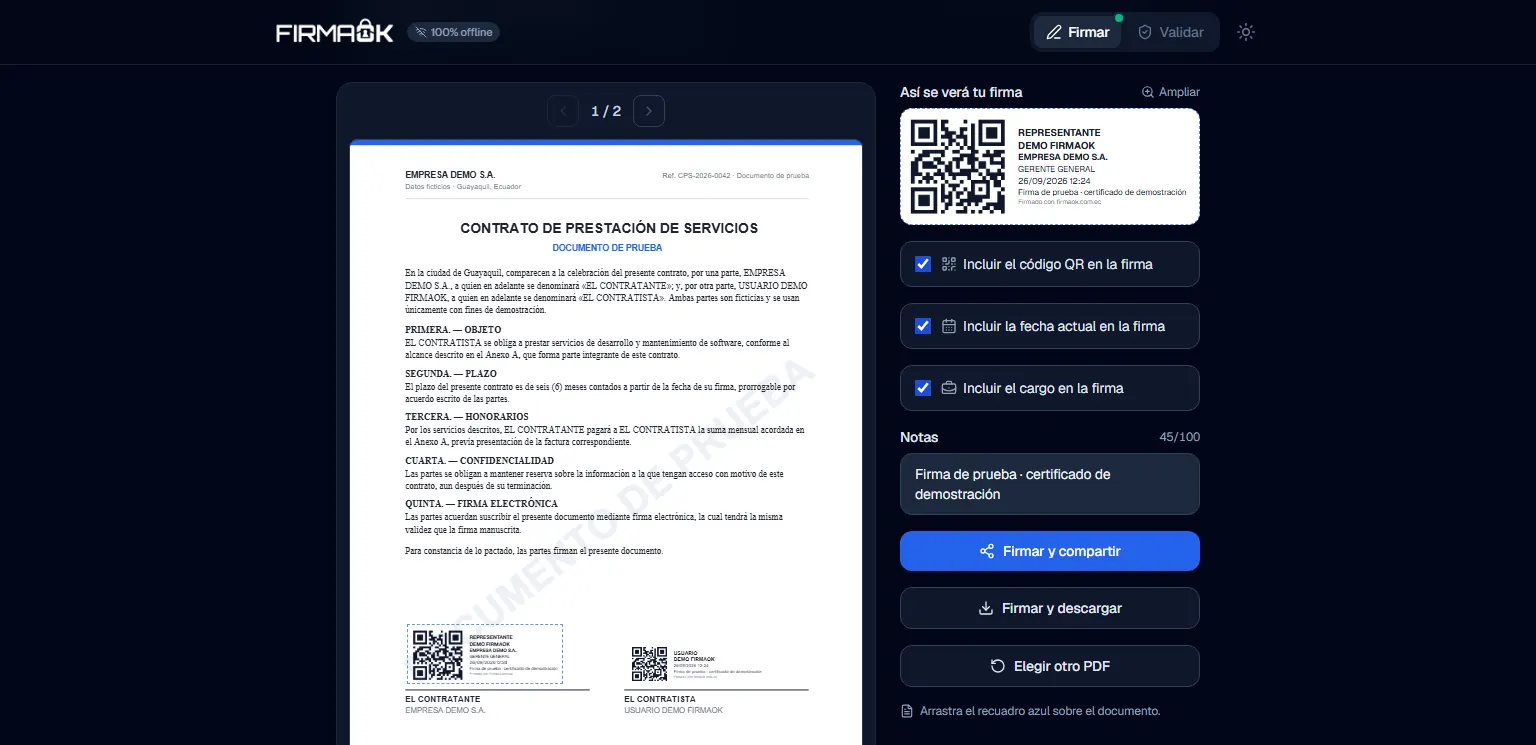
- Visible PAdES-B signatures on any page of the PDF: the user drags the box over the document and its position is converted to PDF coordinates.
- A configurable stamp with a preview identical to the output: QR code, the signer's name, an optional date, an optional job title for legal entities and a free note of up to two lines, which can be enlarged in a dialog.
- Multi-signing: signing a PDF that was already signed adds the new signature through an incremental update, and the earlier ones stay valid.
- An offline validator: signer, ID or RUC tax number, company name and job title, issuer, certificate validity and fingerprint, PAdES profile (B-B, B-T or B-LTA), integrity and the bytes appended after each signature; it also recognises document timestamps.
- Reading the signer's data according to the Ecuadorian schema used by the accredited CAs - Security Data, BCE, Uanataca, ANF, FirmaSegura, CorpNewBest, Lazzate and AppFirmas -, including the signer type: individual, individual with a RUC, or legal entity.
- Signing is blocked with expired or not-yet-valid certificates, with a direct path to import a valid one.
- Informed consent and a privacy notice (LOPDP) before first use, with each certificate deletable at any time.
- An installable PWA that works offline, with light and dark themes, /firmar and /validar routes, and a “Sign and share” button that opens the system's native share sheet with the signed PDF as an attachment.
How it's structured
A Vite + React SPA with no backend: the whole domain lives in src/modules, one module per responsibility, and the pages only orchestrate.
- cert-vault: reads the .p12 with node-forge, imports the key as non-extractable, encrypts it with AES-256-GCM under the master password (Argon2id) and stores it in IndexedDB with the certificate's SHA-256 fingerprint as its id; it also unlocks, lists and deletes.
- crypto-core: builds the PAdES-B CMS SignedData with PKI.js on top of the browser's WebCrypto engine.
- pdf-signer: draws the stamp, reserves the signature slot, lets the /ByteRange be computed, signs with WebCrypto and saves incrementally when the PDF was already signed.
- pdf-validator: extracts each signature working on Uint8Array, with no Buffer, reads the signature dictionary and verifies with PKI.js.
- pdf-viewer: renders with pdf.js at the device's pixel density, with a worker start-up that recovers if it fails, and converts the position of the draggable box (react-rnd) into PDF points with a bottom-left origin.
- privacy-lopda and pwa: the versioned consent screen, the privacy notice and the PWA install prompt.
- lib/ecuador-cert: the Ecuadorian-schema reader shared by the vault, for the stamp, and the validator, for the report, so both show the signer the same way.
- Minimal dependency-free routing - /firmar and /validar - that the nginx fallback and the service worker's fallback also resolve offline. Deployment is a two-stage Dockerfile (built with Node and pnpm, served by nginx) with CSP, nosniff and immutable caching for hashed assets.
Signing, step by step
Every signature is PAdES-B (B-B profile): a detached CMS embedded in the PDF that covers every byte of the file except the slot it is stored in.
- The certificate is checked to be valid at signing time; if it is not, the process stops there.
- If the PDF already contains a /ByteRange, the work is incremental; otherwise the file is rewritten in full, which also repairs PDFs with a broken xref.
- The stamp is drawn on the chosen page and the signature field is added with SubFilter ETSI.CAdES.detached, a reason, a location - the certificate's address or, failing that, the company name - and a 24,576-byte slot in /Contents for the CMS.
- @signpdf computes the /ByteRange - the two stretches of the file on either side of /Contents - and hands those bytes to a custom signer that delegates to WebCrypto.
- The CMS is built with PKI.js: a SHA-256 digest of those bytes and the signed attributes content-type, message-digest, signing-time and signing-certificate-v2, which binds the signature to the exact certificate. It is signed with RSASSA-PKCS1-v1_5 and the non-extractable key, and the certificate chain is embedded.
- The CMS DER is written into the reserved slot, and the signed PDF is downloaded or shared through the system's native sheet.
- Validating walks the same path backwards: it finds each /ByteRange, parses the CMS, recomputes the digest of the covered bytes, verifies the signature and detects the profile (B-B, B-T or B-LTA) and how many bytes were appended after each signature.
Inside the site
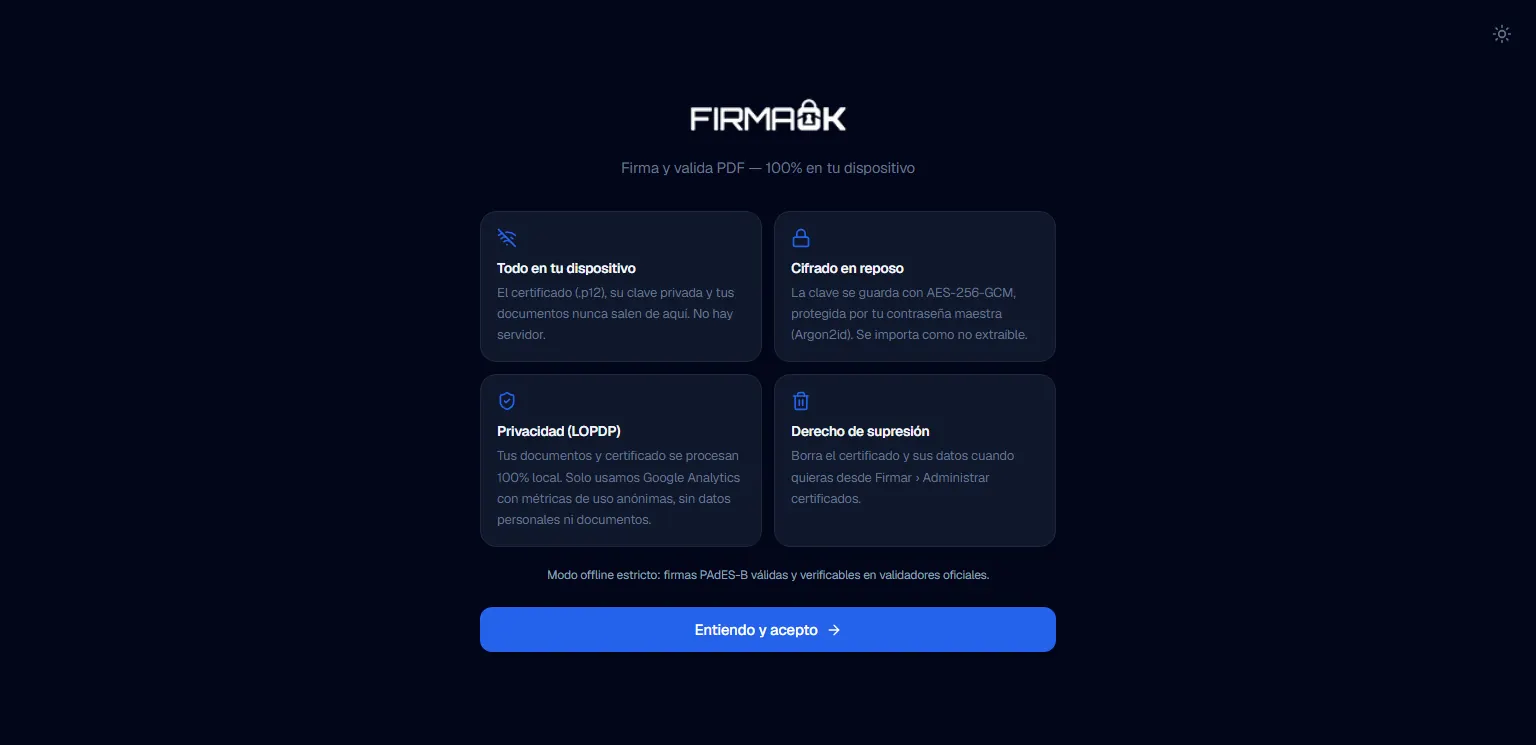
Informed consent (LOPDP): everything is processed on the device and the certificate is stored encrypted. 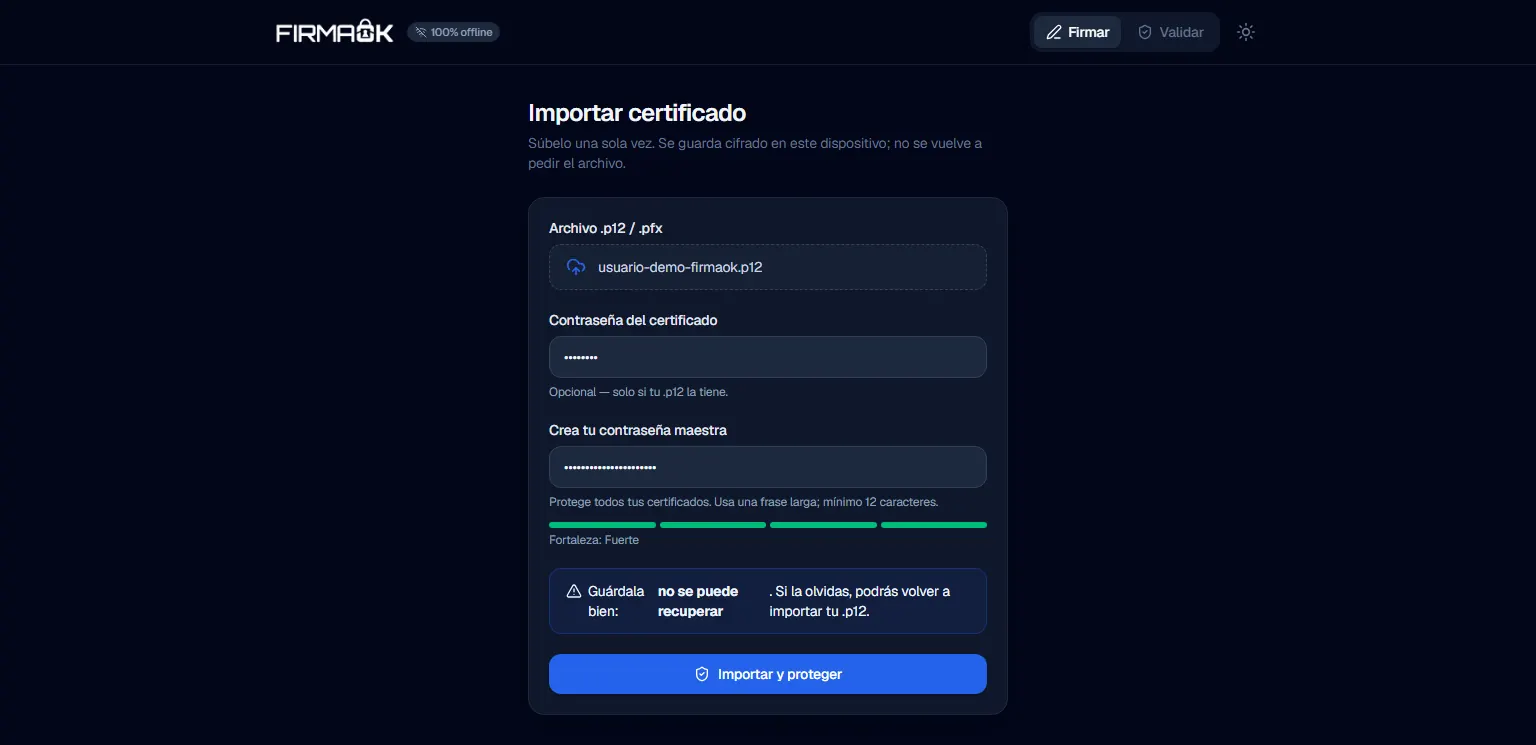
Importing a test .p12 certificate and creating the master password. 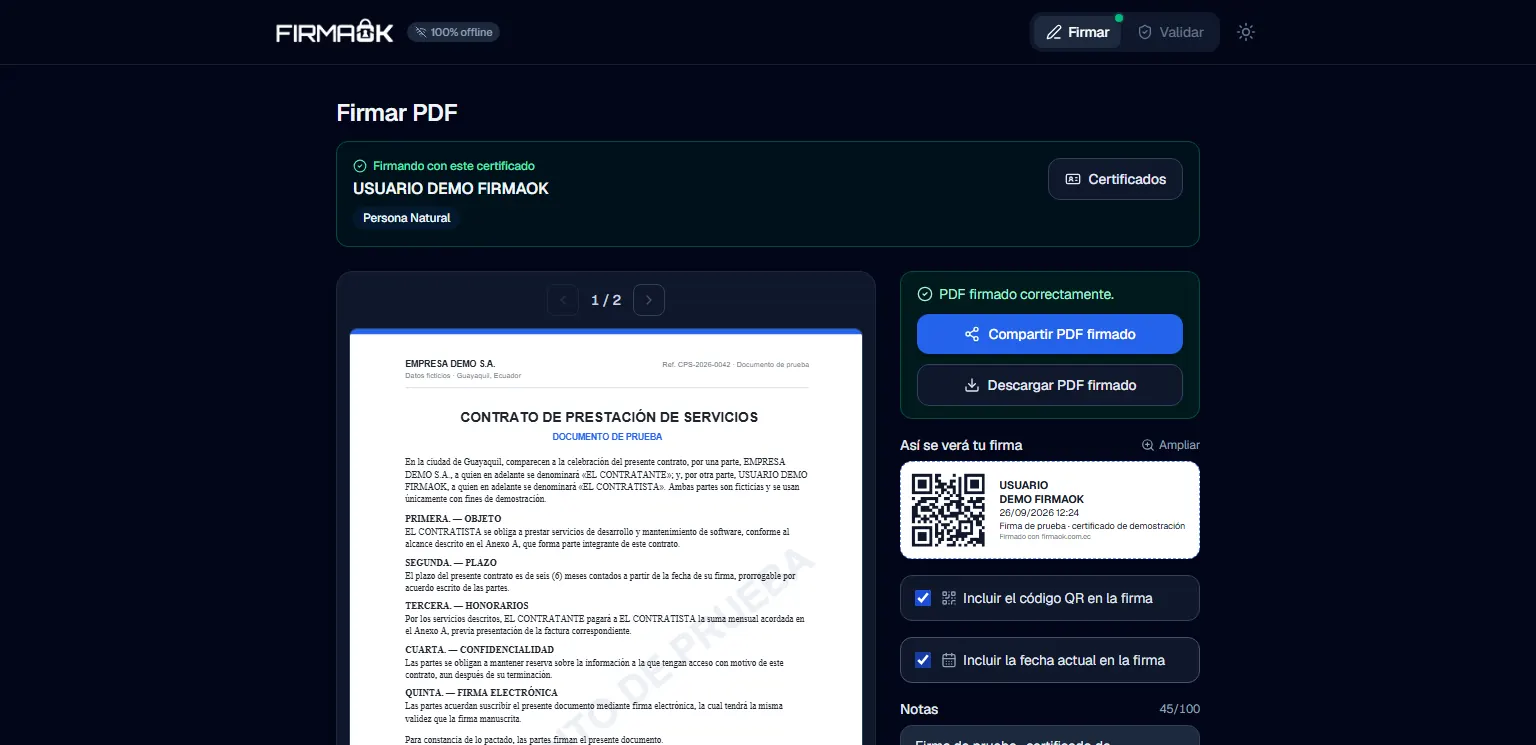
Signature completed with the test certificate, ready to share or download. 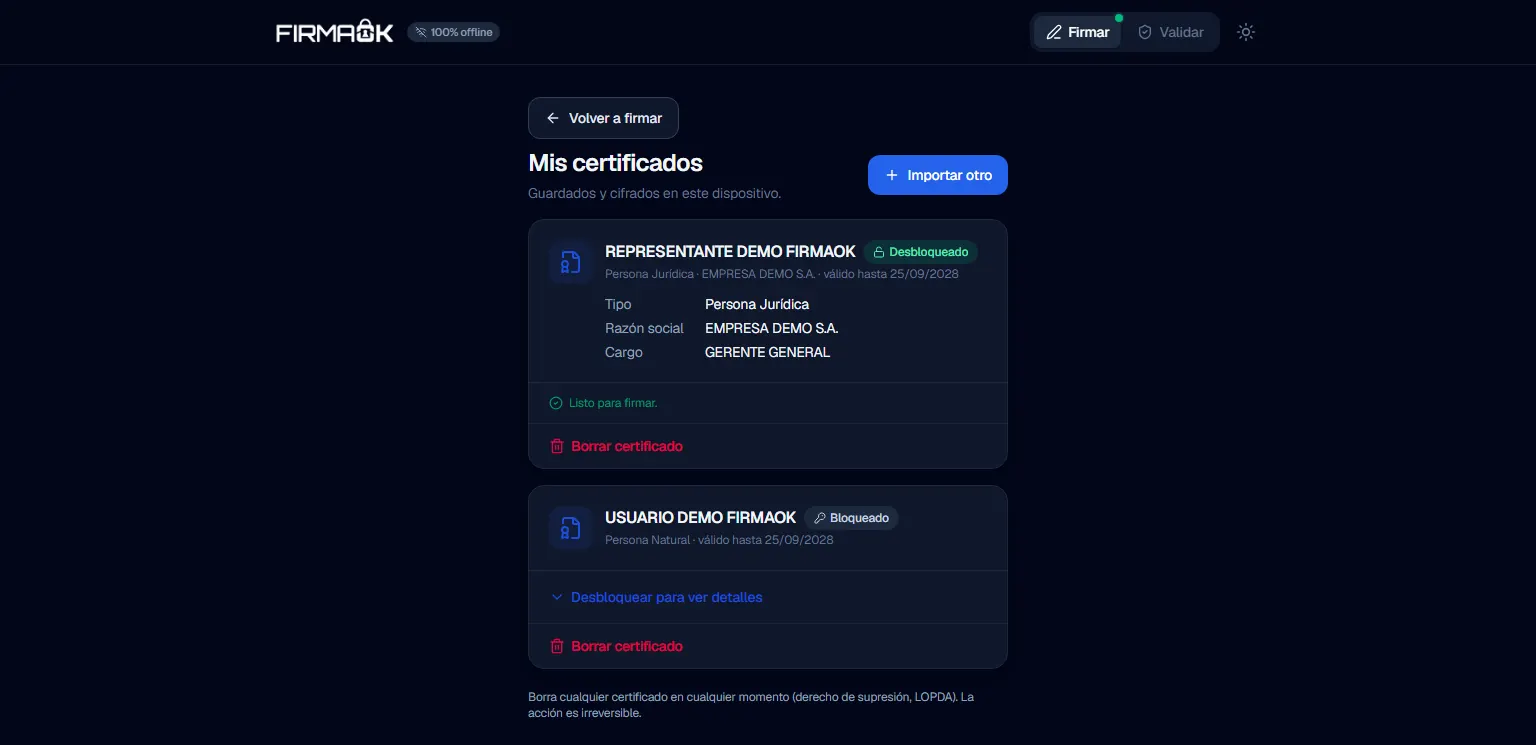
Two test certificates stored encrypted on the device. 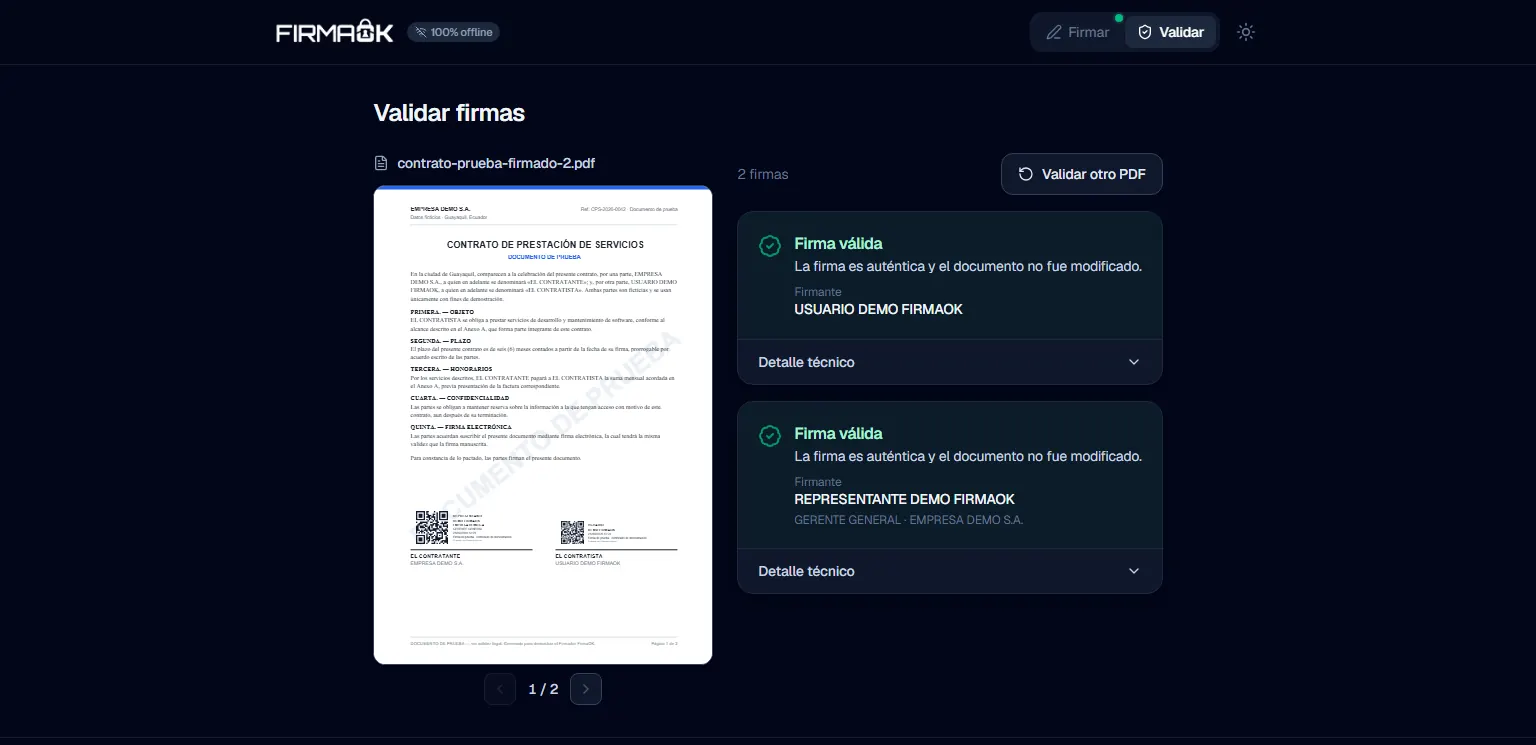
Offline validation: both signatures on the sample contract are valid. 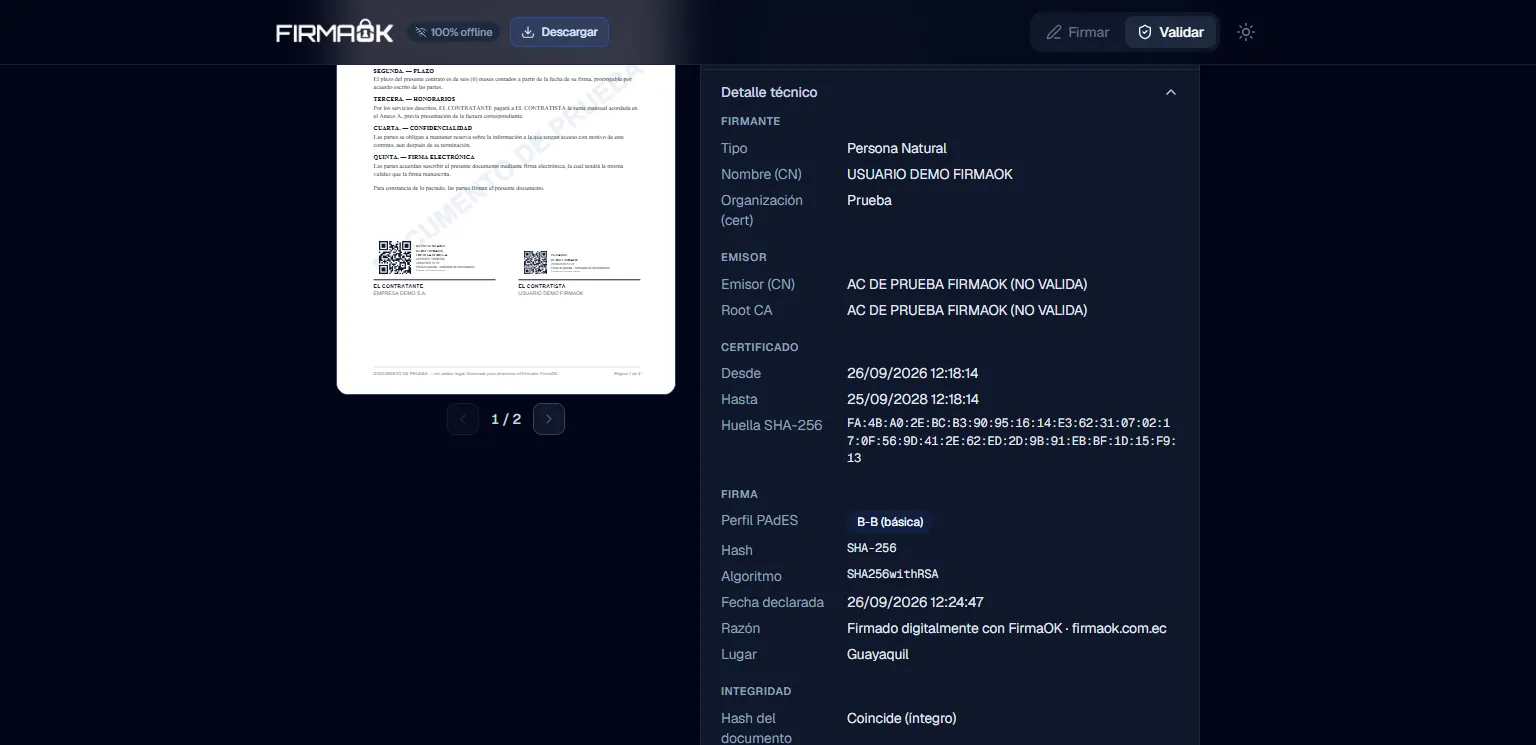
Technical detail of a signature: issuer, validity, SHA-256 fingerprint, PAdES profile and integrity.
Technical decisions
- The private key is imported into WebCrypto as non-extractable and with signing permission only, and the PKCS#8 buffer is overwritten with zeros afterwards. An injected script could at most request a signature while the session is open, but never walk away with the key; a strict CSP - default-src 'self' and no inline scripts - closes that door as well.
- A single master password, derived with Argon2id (64 MB of memory and 3 passes, in WebAssembly), encrypts every stored certificate with AES-256-GCM. The AES key is never persisted: it is derived again on every unlock, and the .p12 password is not asked for again after the import.
- Re-signing uses an incremental update (ISO 32000-1 §7.5.6) instead of pdf-lib's normal save: rewriting the file moves every offset and breaks the /ByteRange of earlier signatures. The original bytes stay untouched and only the new objects are appended at the end, with their own xref section.
- The service worker precaches the whole app shell, including the pdf.js worker, so signing and validating work offline. That worker is emitted as .js rather than .mjs because some hosts serve .mjs with a MIME type the browser rejects, and nginx delivers sw.js and index.html uncached so updates get through.
- Privacy from the first screen: consent under Ecuador's LOPDP before using the app, a privacy notice always at hand, and deletion of any certificate whenever the user wants (right to erasure). Only the data needed to tell one certificate from another stays in clear text - name, signer type, ID number, company name and expiry date -, while the key and the remaining metadata are encrypted; when Google Analytics was added, the consent was versioned up so everyone would see it again.
- The stamp is drawn into the page content and the signature field carries a 0×0 widget: with a stamp-sized widget, viewers such as Google Drive or Adobe on mobile painted it with the light-blue highlight used for form fields.
Challenges
- pdf-lib only knows how to rewrite the whole document. Saving incrementally meant fingerprinting every object when the PDF is loaded, writing only the ones that changed, chaining the new xref with /Prev - on originals with an xref stream (PDF 1.5+) too - and reserving the previous revision's object numbers, because pdf-lib drops object streams while parsing and would reuse the numbers of live objects. On top of that, @signpdf always names the new field “Signature1”, and to viewers two fields with the same name are the same field, so it is renamed to the first free SignatureN.
- Reading the signer from the certificates of every accredited CA: each one uses its own OID arc (1.3.6.1.4.1.<PEN>.3.N), Uanataca adds an intermediate suffix, AppFirmas uses no extensions and puts the ID and RUC in the Subject DN with prefixes, some deliver the RUC in binary, and a legacy ANF OID carries its arc number instead of the RUC. It was solved by detecting the arc by its suffix and accepting only values shaped like an ID (10 digits) or a RUC (13), plus fixing names with accents and Ñ that arrived mis-decoded.
- A validator that does not overstate things offline: it discards /ByteRange matches that are not a real CMS, handles indefinite-length (BER) CMS, tells document timestamps (ETSI.RFC3161) apart from personal signatures, and reports B-T only when a genuine RFC 3161 token is present. What cannot be checked offline - OCSP/CRL revocation and the chain of trust - is marked as not verified in the report itself.
- Biometric unlock with WebAuthn and the PRF extension was actually built, with routing to the platform authenticator, a fallback and a way out when the unlock got stuck, and was later removed to leave a single unlock method: the Argon2id master password.
Result
The signer is a static PWA built with Docker and served by nginx on Railway: it signs and validates PDFs in the browser, with no backend receiving documents or certificates, and keeps working offline. Re-signing a document keeps earlier signatures intact, and the core - .p12 parsing, the encrypted vault, the PAdES CMS, signing, multi-signing and tamper detection - is covered by automated tests, including cases that reproduce the certificate structure of eight Ecuadorian CAs.